How To Recover Deleted Messages From Android Devices We all now fully depend on our Android smartphone. We utilize our Android smartphone to perform various tasks like making calls, sending SMS, browsing the internet, watching videos etc. Android is an open source operating system which can run almost every type of apps for different purposes. In this article, we are going to talk about restoring deleted text messages. Well, sometimes we unintentionally delete our text messages and later regret it. Recovering deleted files was never an easy task. However, there are several methods available out there which can help you to restore the deleted files. We will be using an awesome tool from dr.fone that will help you to recover deleted text messages from Android What Is Dr.Fone – Recover (Android Data Recovery)? In short, this is a remarkable data recovery tool prepared for the desktop computer which helps a user to recover lost data from their Android smartphone. No matter wha...
Get link
Facebook
X
Pinterest
Email
Other Apps
How to play youtube videos with the screen off on phone
Get link
Facebook
X
Pinterest
Email
Other Apps
-
How to Play Youtube Videos With the Screen Off On phone
The method is simple and straight and you need to follow the simple step by step guide below.
#1 Play YouTube Videos in Background Without Rooting Android
The best part of this method is that you won’t need to root your Android device. Therefore go through the post to know how to play YouTube videos in the background without rooting your Android Device.
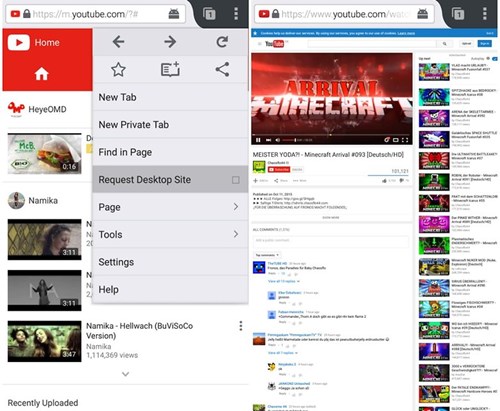
Youtube can be accessed through the web browsers too as we all know, but can we induce the above feature of enabling video playback even on the screen off in Youtube just through using any browser? Yes! this functionality can be enabled by using the Firefox web browser, first download and install the browser on your smartphone and then follow the further Youtube settings inside the browser.
Open the browser and then go to the Youtube website and then head on to the settings page of Youtube from there. From the option there, request the desktop website of Youtube on your phone, once that launches on your device, you can easily play any of the videos from there. The videos won’t pause or stop even if you turn off the screen of your device!
Play Youtube Videos With the Screen Off
Play Youtube Videos With the Screen Off
Note: You should check that the Youtube desktop website is launched on your device from where you can play the videos as the function won’t work if you use the mobile Youtube site.
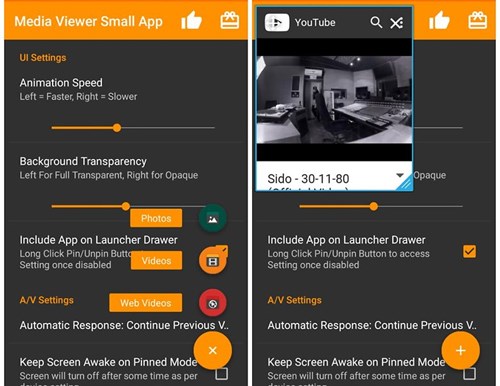
If you are owning any Sony Xperia device then there is a trick for that device through which the Youtube videos can be played even on the lock screen or the screen off. Just download and install the Media Viewer Small app from the Play store and then open it up on your device.
Play Youtube Videos With the Screen Off
Play Youtube Videos With the Screen Off
Now tap on the square button of your device for some time and then touch the arrow placed below the screen. You have to access the Web Videos app from there, and then inside this app, you can easily search for the Youtube videos and play them inside. This app allows to play the videos even under the screen off.
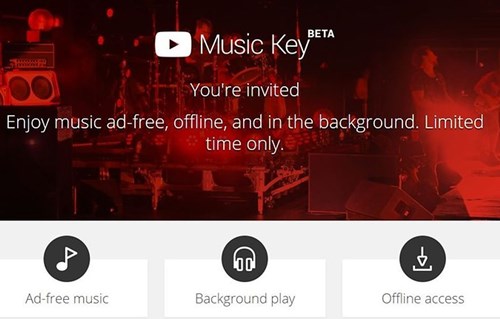
This is a type of Youtube service that lets to play the Youtube content even when the screen is turned off or the Youtube is played in the background. You will need to pay for the subscription and then activate it from inside the settings of the Youtube and then play the videos after that. The functionality will be activated and therefore the videos can be played even in screen off.
Play Youtube Videos With the Screen Off
Play Youtube Videos With the Screen Off
Using New Pipe
Well, NewPire is an open source Android application which you can use for background playback. The app is not available on the Google Play Store. However, you can get the app from F-Droid which is one of the best app stores. Here’s how you can use NewPipe to play YouTube video with the screen off on Android.
Step 1. First of all, visit this link and then download the F-Droid app on your Android device.
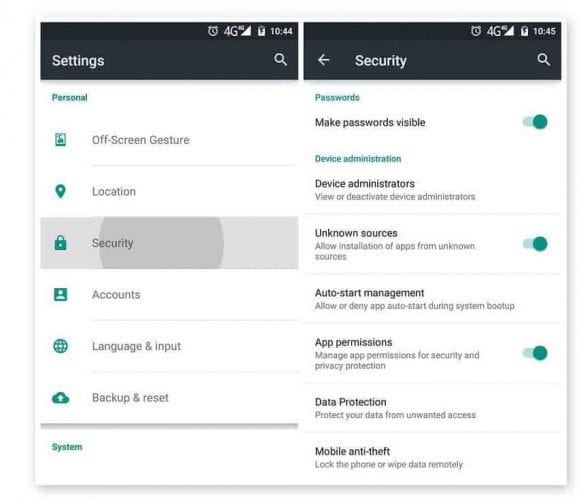
Step 2. Now visit the Settings > Security and then enable the Unknown Sources. Now move to the folder where you have saved F-Droid and install it normally.
Step 3. Now on the F-droid, search for NewPipe and install it on your Android smartphone. You can also get NewPipe from here.
Step 4. Now open the NewPipe Android app and then utilize the search bar to search for your desired song.
Using New Pipe
Using New Pipe
Step 5. You just need to click on 3 dots and then select the ‘Switch to background’. This option will continue to play the video even when the screen is off.
That’s it, you are done! This is how you can use NewPipe to play YouTube videos with the screen off on Android.
So that was the method through which you can easily set up your Youtube to not turn off playing of videos in screen off of your device. This isn’t the very difficult method to be applied and you just need to go through some steps and use the basic surfing techniques only. You may love this function in your Youtube as this will also deduct the accidental stopping of your videos when the lock button is pressed suddenly. Your videos will remain playing in the off-screen and hence you can listen to the music or the sound of the Youtube videos in screen off, isn’t that nice!
Top 20+ Ultimate Hidden Tricks and Features Of Android Below we are going to discuss some cool things that might be unfamiliar to you. So have a look at these cool features below. Cool Features Of Android Device: These features are mainly dependent on developer options which you can enable by heading to Settings -> About Phone -> Build Number (Tap on build number 7-10 times and your developer options will get activated). #1 Controlling the Data Usage Well, many of you will know about this feature, but I am sure very rare one utilize this. This is very helpful feature that comes with Android. You can monitor your data usage and control it. You can set the maximum data limit for a particular date. Controlling the Data Usage Controlling the Data Usage For that Open setting > Data Usage > Set Mobile Data Limit, here you can configure the data limit. #2 Quickly Change WiFi Network Quickly Change WiFi Network Quickly Change WiFi Network If ...
🌀 HOW TO GET ACCESS TO BLOCKED WEBSITES 🌀 Let us discuss all the methods i.e., from easier methods to harder ones. 1. Recast the URL This trick works for the sites which are hosted on VPN and on Dedicated server Environment and have an unverified SSL installed for that domain name. To get access to such websites you have to implement 2 simple steps. They are: 1. Go to the address bar of the browser (Any browser) 2. Instead of typing www.websiteURL.com or http://www.WebsiteURL.com, try typing https://www.WebsiteURL.com So, as the domain is unverified with SSL installation, it will show up a security notice with the options as Proceed anyway or Back to Safety. Here, you have to select the option Proceed Anyway, then you will get an entry ticket to the site. 2. DNS Server Replacement In this method you have to change or replace the DNS server to get access over the blocked websites. Say, DNS server is the container which contains all the information regarding all the...





Comments
Post a Comment